Adjusting quality goals
Adjust the quality goals to help you monitor the progress of the code quality in your repository dashboard, and configure which files Codacy considers complex or duplicated.
Codacy displays the quality goals as dashed lines on the quality evolution chart to help you monitor the progress and overall quality status of your repository.
To access the quality goals, open your repository Settings, tab Goals. The following screenshot displays the default configuration values:
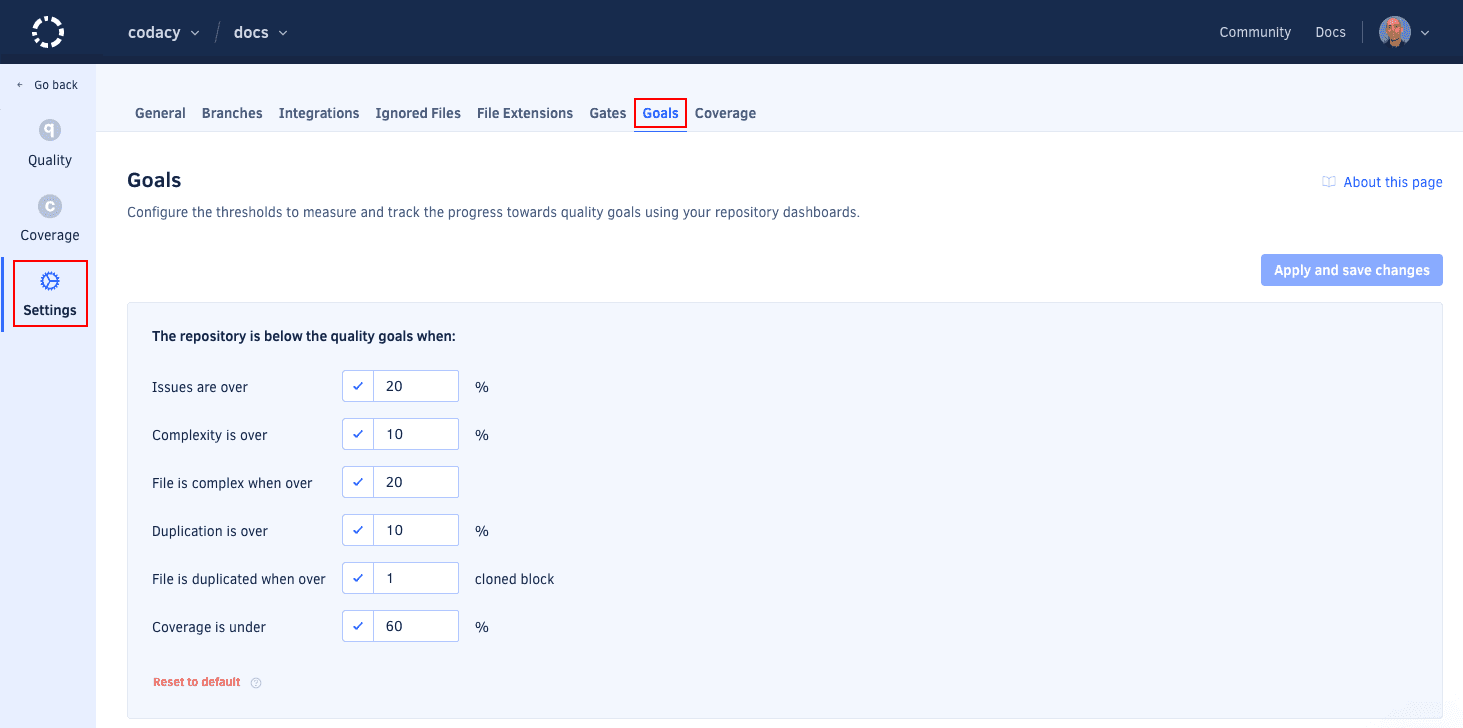
- Issues are over: Defines the threshold displayed on the tab Issues of the quality evolution chart.
- Complexity is over: Defines the threshold displayed on the tab Complexity of the quality evolution chart.
- File is complex when over: A file is considered complex when its complexity is over this value.
- Duplication is over: Defines the threshold displayed on the tab Duplication of the quality evolution chart.
- File is duplicate when over: A file is considered duplicated when it has more clones than this value.
- Coverage is under: Defines the threshold displayed on the tab Coverage of the quality evolution chart.