Integrating Codacy with IntelliJ IDEs
The Codacy IntelliJ plugin is an open-source plugin for IntelliJ IDEs that lets you review the result of the Codacy analysis for a pull request, get the full list of problems found, and navigate to any issue that you want to review and fix.
Interface overview
The main view of the Codacy IntelliJ plugin provides a summary of the code quality and coverage changes introduced by the pull request of the currently checked-out branch.
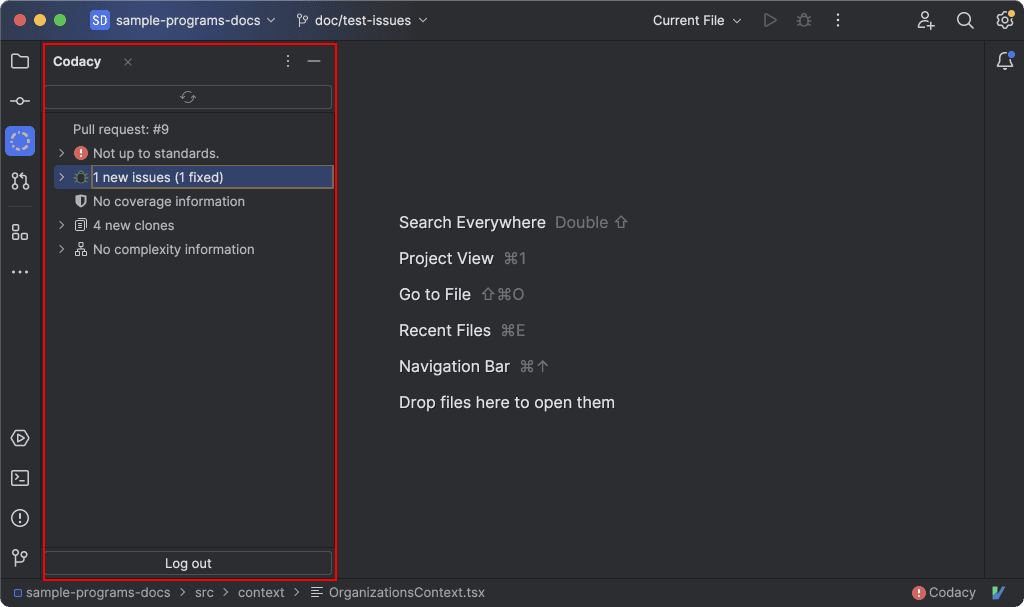
In the main view, you can find the following information:
-
The Status of the pull request, either up to standards or not up to standards, based on the Gates set for the repository.
-
Any issues introduced or fixed by the pull request. These are the same issues you find in the Issues tabs in the Codacy app and are also visible in IntelliJ's Problems tab.
When this item is expanded, the number next to each file name is the total number of issues that the pull request adds to that file.
-
The diff coverage introduced by the pull request. The percentage next to each file name is the coverage variation for that file.
-
Sequences of duplicate code (clones) introduced by the pull request. These are the same ones you find in the Duplication tabs in the Codacy app.
-
Variations in code complexity introduced by the pull request.
Installing the Codacy IntelliJ plugin
-
Make sure that the repository you’re working on is analyzed by Codacy and that you have a repository read role or higher.
tipIf this is your first time using Codacy, see how to add and analyze your first repository.
-
Install the plugin from the JetBrains Marketplace or through the plugin settings panel in your IntelliJ IDE.
Getting pull request quality and coverage data
To see Codacy quality and coverage data for an open pull request, follow these steps:
-
Open the repository directory in your IntelliJ IDE.
noteIf the repository isn't on Codacy yet, add it to Codacy first.
-
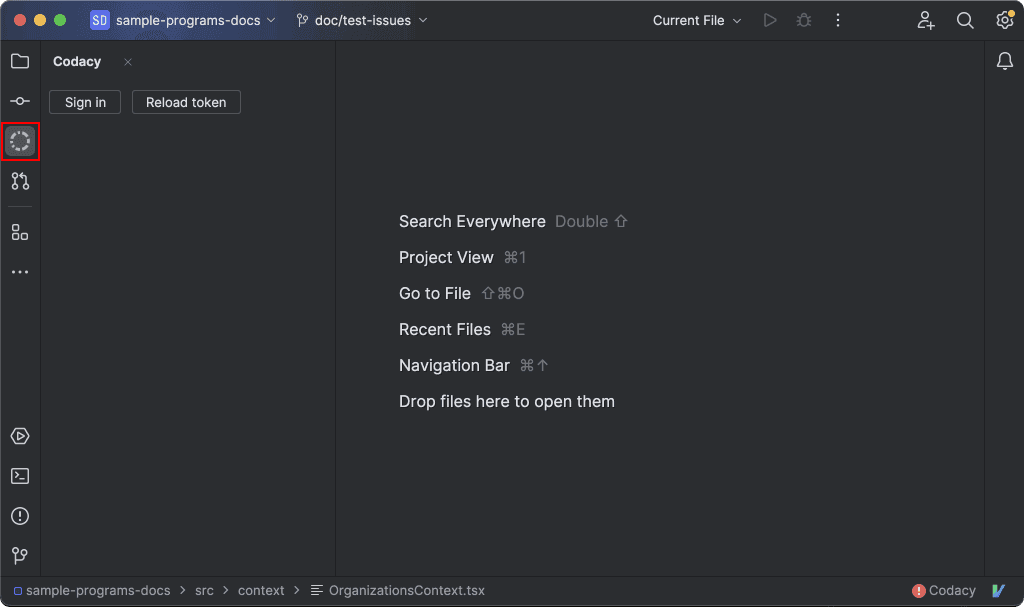
Open the main view by clicking the Codacy logo in the left tool window bar.
-
If you’re not signed in, click the Sign in button to authorize IntelliJ on Codacy.
-
Check out the pull request of interest.
After completing these steps, the main view shows the result of the latest Codacy analysis for the pull request.
Reviewing pull request issues
In the Problems tool window, Codacy displays the same issues you find in the main view and lets you navigate to the exact line of code where the issue was found.
Code coverage, duplicates, and complexity aren't currently shown in the Problems tool window.
To review issues:
-
Open the file you want to review.
You can find the list of files with issues in the main view of the Codacy plugin. Double-click the file name to open it in the editor.
-
Open the Problems tool window (use
Ctrl+6on Windows/Linux orCmd+6on macOS) and select the File tab.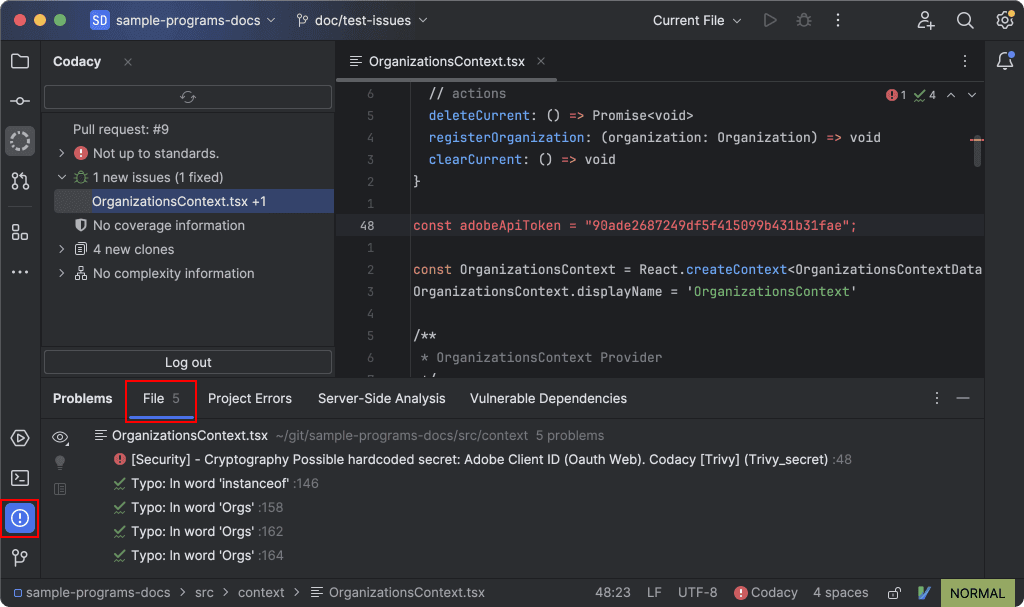
-
Click the name of the issue you want to review.
-
Hover over a highlighted issue in the code editor to view available actions and suggested quick fixes, if available.
For a list of tools that support suggested fixes, see Supported languages and tools.
-
Once you've addressed the problems in your code, push your changes to the Git provider so that Codacy analyzes the updated code.
When the analysis is complete, the Codacy plugin automatically refreshes the pull request analysis result. You can also refresh the pull request data manually by clicking the Refresh Pull Request button in the main view.
Running Codacy Guardrails
As of version 0.0.8, the IntelliJ plugin now supports Codacy Guardrails. To see how to get it quickly setup refer to our quickstart guide here.